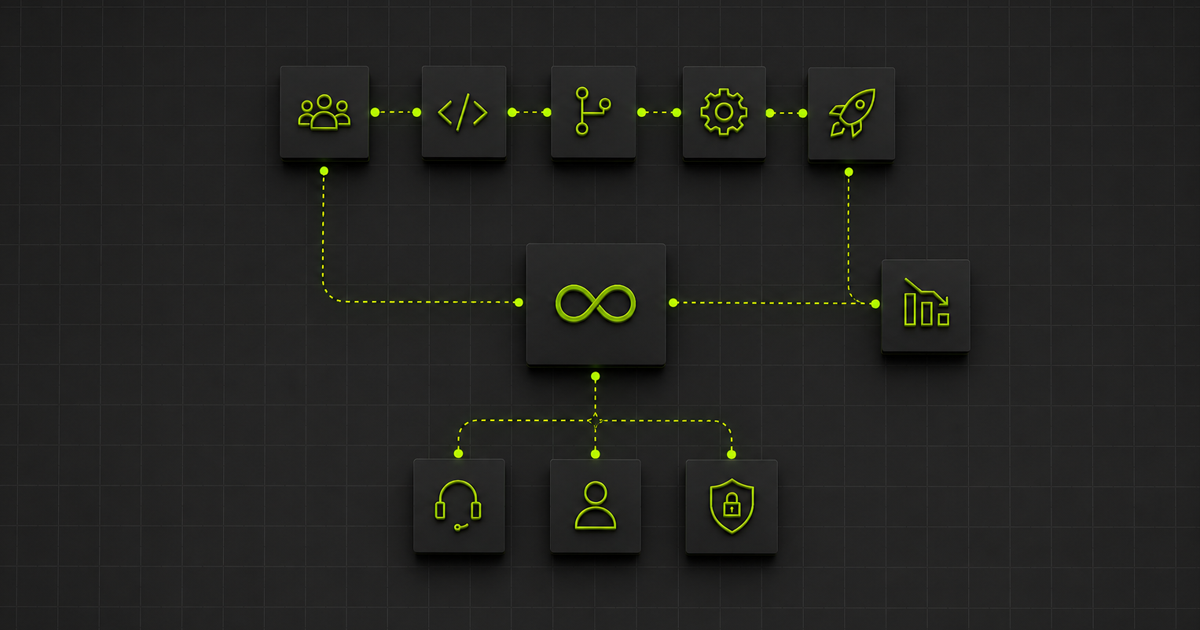


DevOps automation usually means CI/CD. Inside the engineering team, that automation is mature. The hard part is the connective tissue between development, ITSM, communication, and security tools, where most DevOps strategies quietly stop investing and where the actual cost of operating a modern software-delivery organisation lives.
This article covers what DevOps automation has to bridge across the four tool categories, why iPaaS alone does not solve it, and the operating-model shift that lets the engineering team's velocity gains actually reach the business. For the broader ITSM integration view, see our DevOps integration guide on connecting Jira, GitHub, Slack, and your ITSM system. For the Azure DevOps specifics, see how to integrate Azure DevOps.
Key takeaways
- DevOps automation that stops at the CI/CD pipeline leaves the engineering team's velocity gains stranded in the handoffs to operations, support, and security.
- The four tool categories DevOps automation has to bridge are development, ITSM, communication, and security. Each has its own change cadence and its own owners.
- iPaaS solves the bidirectional sync layer. It does not solve operational ownership or predictable cost, which is where most enterprises get caught.
- A managed integration service operates the connective tissue across the four categories as a continuous service, with predictable pricing and operational accountability.
What DevOps automation usually means, and what it should mean
When most teams say "DevOps automation", they mean CI/CD. Continuous integration. Continuous deployment. Pipeline-as-code. Maybe infrastructure-as-code. These are real, valuable disciplines and they are mostly solved inside the engineering team.
The piece that most teams underinvest in is the automation that has to exist around the CI/CD pipeline to make DevOps work as an operating model rather than a tools choice. When a customer-reported incident in Zendesk needs to become a Jira issue, a Slack notification, an Azure DevOps work item, a ServiceNow change record, and a status-page update, somebody is automating that. Usually with three different tools held together by configuration that two engineers remember how to maintain. Usually with no monitoring of whether the chain completed. Often with no escalation if it did not.
That handoff layer is where DevOps automation either delivers business value or quietly fails to. It is the connective tissue between the engineering team and the rest of the organisation.
The four tool categories DevOps automation has to bridge
A working DevOps automation strategy bridges four categories of tooling. Most strategies treat one of them as primary and the other three as integration problems for somebody else.
1. Development and source control
Azure DevOps, GitHub, GitLab, Bitbucket. The CI/CD pipelines, the pull request flow, the artifact registry. This is where most DevOps automation effort historically focuses and it is comparatively mature.
For Azure DevOps specifically, our Azure DevOps integration guide covers the API patterns, the marketplace options, and the bidirectional sync setup in depth.
2. ITSM and operations
ServiceNow, Jira Service Management, Zendesk, Freshservice, BMC Helix. The incident management system. The change advisory board. The customer-facing service desk. This is where the engineering team's work has to be visible to operations, support, and the business.
Our DevOps integration guide covers connecting Jira, GitHub, Slack, and your ITSM system as a connected layer. For the Jira-to-ServiceNow case specifically, see our three-way ServiceNow-Salesforce-Jira integration story.
3. Communication and collaboration
Slack, Microsoft Teams, email, the status page. The places where humans actually find out what is happening. DevOps automation that does not reach these tools may as well not have happened, because the team that needs to act on the information cannot see it.
4. Security and compliance
The vulnerability scanner, the SIEM, the audit trail, the compliance reporting tool. This overlaps with DevSecOps. Our DevSecOps integration guide goes deeper on the security tooling layer specifically.
Each category has its own tools, its own state machines, its own update cadences, its own owners. The DevOps automation strategy that takes its CI/CD pipeline seriously and treats the other three as afterthoughts ships fast inside the engineering team and slowly across the rest of the business.
Why the connective tissue ages badly
The CI/CD pipeline ages well because one team owns it and updates it on a consistent rhythm.
The integration between Azure DevOps and ServiceNow ages badly because neither team owns the integration as their primary responsibility, and neither team's update cadence aligns with the other's. The engineering team ships changes weekly. The operations team ships ServiceNow configuration changes on the Now Platform's twice-a-year release cadence. The customer support team updates Zendesk field mappings whenever they hit a process gap. The security team has its own quarterly review cycle.
When all of these need to integrate, the integration has to absorb the impedance between change rates that are out of phase with each other. That work is genuine engineering work and it is the work most DevOps strategies do not budget for.
Three things that have to be true for DevOps automation to work across the estate
For DevOps automation to deliver on its promise across the four tool categories, three things have to be true.
Bidirectional sync at scale. When an incident is created in ServiceNow, it flows to Jira or Azure DevOps with full context. When the engineering team updates the work item, the update flows back to the customer-facing tool with full status, comment, and attachment fidelity. When the change ships, the status page and the audit trail update. This happens across many tool pairs, in real time, without dropping data when one of the platforms updates.
Operational ownership. When the integration breaks, somebody is responsible for fixing it. Not the engineering team, who already have a backlog. Not the operations team, who do not have the engineering context. Someone whose primary responsibility is the integration layer itself, who can respond at the cadence of incidents rather than the cadence of projects.
Predictable cost. As DevOps automation scales, transaction volumes scale with it. A consumption-priced integration model exposes the business to cost volatility that is hard to commit to in SLA contracts. The integration layer that scales DevOps automation has to do so at predictable cost, or the finance team becomes the limiting factor.
Most enterprises get the first one. Few get all three.
Approaches for automating DevOps integration across the estate
Four approaches cover most of the practical landscape. Each fits a different stage of the operating-model question.
Native integrations and marketplace apps
Atlassian Marketplace, ServiceNow Store, GitHub Marketplace, Slack App Directory. Each ecosystem has native or marketplace integrations for common pairs. Azure DevOps to Jira, ServiceNow to Slack, GitHub to Teams.
The advantages are familiarity and lower setup cost. The trade-offs are depth of field mapping, the operating-model question of who maintains the configuration as both platforms evolve, and the limited reach when the integration crosses three or more tool categories.
Best for: small, contained automations between adjacent tools.
iPaaS plus internal team
Boomi, MuleSoft, Workato. These platforms cover the bidirectional sync at scale problem. Your internal team operates them. This is a halfway model. The platform vendor owns the platform layer. Your team owns the configuration, the operations, and the outcomes.
Our iPaaS solutions guide covers the iPaaS choice in detail.
Best for: enterprises with broad iPaaS needs across data, applications, APIs, and AI agents, and the engineering capacity to own the platform.
Custom-built integrations on internal infrastructure
Some engineering teams build the connective tissue themselves on internal infrastructure. This works when integration is a strategic differentiator and the team has the capacity. It does not scale gracefully because each new tool category added to the DevOps estate adds maintenance burden the team cannot offload.
Best for: organisations where integration is core IP and the team has the capacity to operate it.
Managed integration service
A managed integration service operates the connective tissue on the customer's behalf. Implementation, monitoring, maintenance, change response, and platform-update adaptation are all included as a continuous service. The DevOps automation crosses tool categories without the customer's team becoming the integration team.
This is the path that scales DevOps automation across the full tool estate without proportional engineering headcount growth.
Best for: enterprises running DevOps automation across multiple tool categories, particularly where the integration count and change cadence have outgrown what an internal team can keep current.
Best practices for DevOps automation across the tool estate
Four practices separate the DevOps automation that delivers business value from the kind that only delivers pipeline metrics.
- Map the four categories explicitly. Inventory the tools your DevOps automation has to bridge across development, ITSM, communication, and security. Most teams find the inventory itself is the work that exposes the operating-model gap.
- Treat the integration layer as a first-class engineering concern. Not as a configuration problem for the team to solve when it breaks. The integration between Azure DevOps and ServiceNow is engineering work, and budgeting it as such is the difference between automation that holds up and automation that quietly degrades.
- Monitor the handoffs continuously. The integration that completed the demo and stopped working in week four is a common pattern. Continuous monitoring of data-flow integrity (not just system uptime) is what catches the silent failures before they reach the customer.
- Commit to predictable cost at the integration layer. Consumption-priced integration platforms expose the business to cost volatility as DevOps automation scales. The integration layer underneath a DevOps strategy committed to SLAs needs to have a fixed shape that the finance team can plan around.
What changes when integration becomes a service
The difference between operating DevOps automation across the estate yourself and consuming the connective tissue as a service is what you are buying. Three things change at the same time.
Get predictability. One predictable cost that covers everything: implementation, maintenance, monitoring, resolution. No consumption surprises when transaction volumes spike. The integration cost stops moving from quarter to quarter.
Get transparency. Transparent integration technology. No black-box logic. No code only a specialist can read. It works with your entire DevOps estate, whatever tools your team runs, whatever platforms your customers and partners use. For data residency, you get full control over where your data is processed and stored. Visible, auditable, and answerable to whoever is asking.
Get outcomes. The integration is ours to run, and ours to be accountable for. Your engineering team stops fielding integration problems. Your operations team starts seeing the engineering work in their tools. The DevOps automation strategy delivers what it was scoped to deliver.
"For the first time, I can actually see what my integrations are doing. No guesswork. No waiting for something to break before I find out."
IT leader, global managed services provider
Time to change the model?
DevOps automation usually delivers velocity gains inside the engineering team and underdelivers across the handoffs to operations, support, and security. The gap is not in the CI/CD pipeline. It is in the integration layer that connects the engineering team to the rest of the business.
Most enterprises know this and treat it as somebody else's problem. The teams that get DevOps automation right do not. They treat the connective tissue as first-class engineering work and route the operational layer to somebody whose specialism it is.
That shift is the part of DevOps automation strategy that turns CI/CD velocity into business outcomes.
Time to change? Talk to us about what a managed integration looks like for your DevOps automation strategy.