

Most enterprises still run on systems nobody would buy today, and they will keep running them for years. According to the research firm Savanta, 63% of IT decision makers said they depend on between one and 10 legacy applications on any given day, and only 9% said their transformation efforts had put them in a position to retire or replace all of them.
So the practical question is how to keep those systems connected to the cloud platforms, partners and AI agents around them, and how to keep the connections working after go-live. Building the connection is rarely what goes wrong. Keeping it running while everything around it changes and ages is.
Key takeaways
- Legacy system integration connects older applications to modern platforms without replacing them. The connection is the easy part; keeping it working as both sides change is the hard part.
- Legacy systems stay because replacing them is expensive and risky. Only 9% of the IT leaders Savanta surveyed say they can retire all of theirs.
- There are four common ways to connect a legacy system, and they differ most in what they cost after go-live, not in how they are built.
- Agent-ready platforms do not make legacy systems agent-ready. When an AI agent's action depends on a system with no modern interface, somebody still has to build and run that connection.
- What breaks legacy integrations is rarely the interface itself. It is patches, expiring certificates, vendor end of life, changes on the cloud side and the one person who understands the old system.
The operating discipline behind this. The Integration Ops book sets out how Managed Integration Services plan, run and measure integrations over their whole life. Download the book.

What is legacy system integration?
Legacy system integration is the practice of connecting older applications, databases and devices, often ones without modern APIs, to current cloud platforms and partner systems, so that data and processes flow between them, and of keeping those connections working as both sides change. It extends the useful life of systems an organisation cannot yet replace.
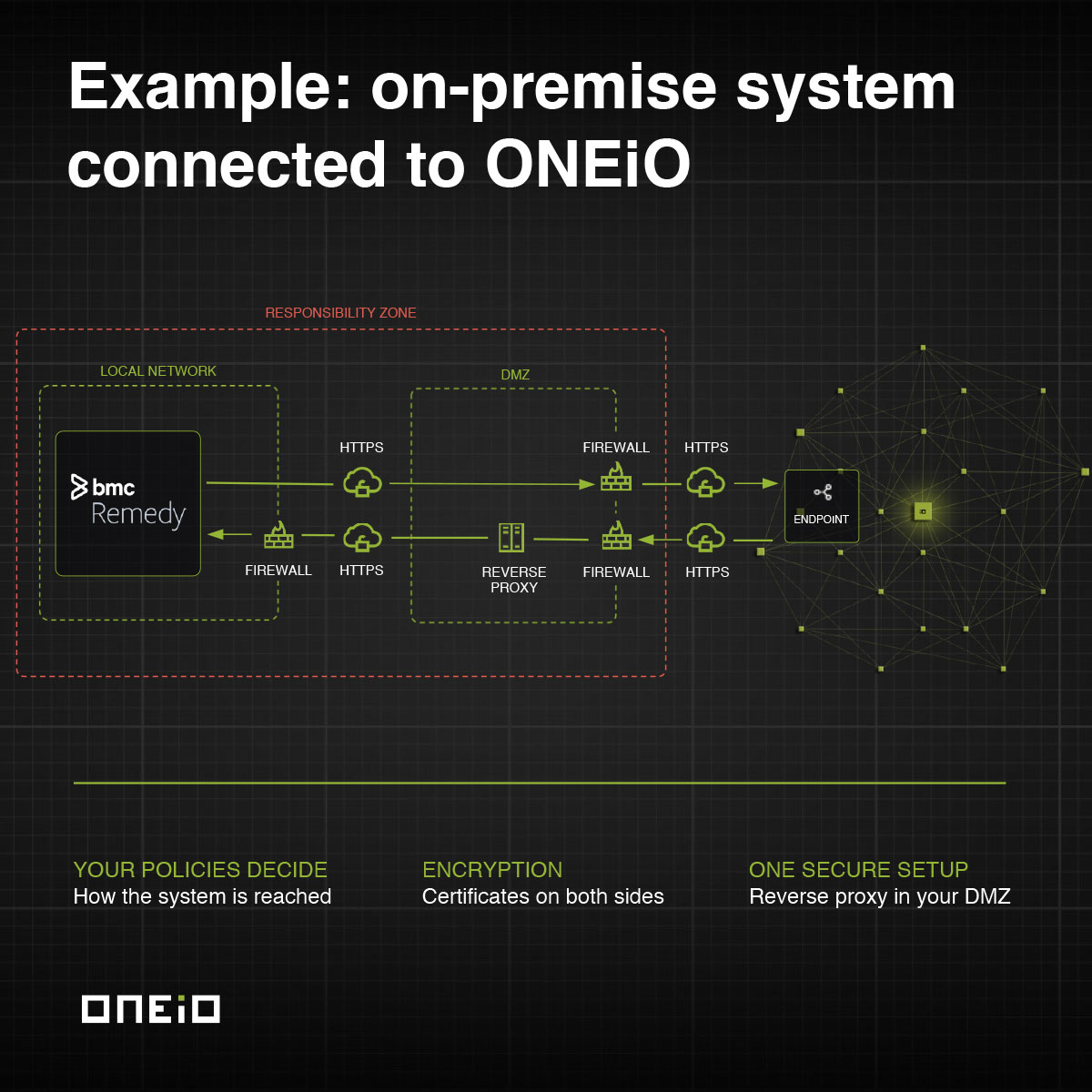
The example above shows an on-premise system connected to ONEiO without leaving the customer's network. How the connection is made is up to the organisation and its own policies. One secure way is shown here: traffic passes through the customer's firewalls and a reverse proxy in its DMZ, encrypted with valid certificates on both sides, before it reaches the ONEiO endpoint. The system keeps running where it is and connects once, and ONEiO handles the links to the cloud platforms and partners on the other side.
Why legacy systems stay
The replacement business case rarely gets approved, and usually for good reasons. The old system works, the people who depend on it know it, and replacing it means a long project with real risk to the process it supports. Savanta's research puts a modelled figure on what staying costs: an estimated $56 million a year on average spent maintaining, updating and integrating with legacy systems. That is Pega's estimate, built by assigning cost values to survey answers, but the direction is clear. The old system stays, and the integration work around it grows.
Roy Illsley, an analyst at Omdia with more than 45 years in IT, describes the kind of system everyone recognises:
"It's not broke, but it's not this century, and you can't get spare parts for it."
Roy Illsley, Omdia
Michael Manea, VP Global Business Services at All for One, which runs SAP application management for thousands of customers, describes what the business asks for when one of those systems sits on a production line:
"How are you going to connect SAP Public Cloud from 2026 with Windows XP? There's no interface for it... and the customer is not ready to do a multiple million dollar investment to change their production line. They say, hey, make it happen, integrate it."
Michael Manea, All for One
That request is the normal case, not the exception. And because nobody accepts downtime any more, the old system cannot be taken offline to be redesigned. Roy again: what organisations do instead is "bolt something onto the side." Every bolt-on is an integration somebody has to keep running.
Four ways to connect a legacy system
Each method below can work. The difference that matters is what each one asks of you after go-live.
1. APIs and wrappers
A modern API layer is built in front of the legacy system, so newer platforms can call it as if it were a current application. This is often the cleanest option where the old system exposes anything at all to wrap.
After go-live: the wrapper is a new system in its own right. It has to be patched, monitored and changed whenever either side changes, and the knowledge of how it maps to the old system tends to sit with whoever built it.
2. Middleware or an integration platform
An integration platform or enterprise service bus sits between the legacy system and everything else, using adapters for older protocols and routing data centrally. It suits organisations that already run a platform and have a team to operate it.
After go-live: your team runs the platform and the legacy adapters. Adapters for old systems are niche, change slowly and are often understood by very few people. Our comparison of on-premise integration platforms covers the options for estates that cannot move everything to the cloud, and hybrid integration platforms the case for mixing on-premise and cloud connectivity.
3. File and database exchange
For the oldest systems, a scheduled file transfer or a direct read from the database is often the only option. It is simple to set up and it works for years.
After go-live: this is where failures hide longest. A file that does not arrive, a job that runs but processes nothing, a column that changes type after a patch. None of these raise an error in the legacy system, so the first sign is usually a business process that has gone wrong without anyone seeing it happen. Where the exchange is with trading partners, the same applies to EDI integration.
4. An operated integration layer
A provider connects the legacy system once, through whatever interface it has, and runs that connection alongside the rest of the estate under a service level. The cloud side can change on its own release schedule without anyone touching the legacy end.
After go-live: the provider monitors the flows, absorbs changes on either side and restores service when something breaks. You keep the knowledge of your own systems and what the business needs from them.
The MCP gap: agent-ready platforms, legacy-bound processes
Integration has a new pressure on it. On 5 May 2026 ServiceNow made its Model Context Protocol (MCP) Server generally available, opening its platform "to any AI agent", and noted that "dozens of enterprise vendors support it". Vendor demos increasingly show agents acting across systems that all speak the same protocol.
Real estates do not look like the demo. An agent can now ask ServiceNow to act, but when that action depends on data from a production line PC running Windows XP, there is nothing on the other side that speaks MCP. Somebody still has to build that connection, keep it working, and answer for it when the agent acts on stale or missing data. The faster agents act, the faster a broken legacy connection turns into a business problem. We cover what changes when agents enter the integration layer in AI agent integration.
What breaks after you connect a legacy system
The interface itself is rarely the weak point. These are:
Patches and upgrades on either side. A security patch on the legacy host or a quarterly release on the cloud platform changes behaviour that the integration relied on. Change of this kind drives most disruption. In research by Arion Research for ONEiO, which surveyed 451 business leaders in three countries in October 2026, 50% traced their integration disruptions to a software vendor changing or retiring an API and 41% to a forced upgrade or version change.
Certificates and credentials. Old systems often authenticate in ways that need manual renewal. When a certificate expires, the integration stops without warning.
Vendor end of life. When the vendor stops supporting the operating system, database or hardware, the integration inherits that risk. There are no fixes coming.
The one person who understands it. Roy Illsley tells the story of a finance system that only one engineer understood: "when John was on holiday, nobody understood if anything went wrong with that system." His conclusion:
"There's only one John Thompson... the reason there was only one John Thompson was because they didn't pay for two John Thompsons."
Roy Illsley, Omdia
When any of these fail, the consequence goes far beyond an IT ticket. It is disruption on a scale nobody plans for: revenue that leaks through orders and invoices that never complete, margin lost to rework and emergency fixes, productivity that drops across every team that depends on the process, service levels that break, compliance that fails, and opportunities that pass while people work around the gap. The same research puts a number on it. The worst integration incident of the year cost a median €136,000 all in, and 55% of that was business impact such as lost revenue, contractual penalties, delayed launches and lost productivity. With legacy systems, finding the cause usually takes longest of all, because the people who know where to look are few.
How to keep legacy integrations running
Know what you have. List every legacy system, every integration into it, the process each one supports and the person who owns it. Most organisations find the owner column the hardest to fill.
Monitor the process, not just the interface. An interface can report success while the business process behind it has stopped. Michael Manea puts it plainly:
"You need to monitor not just the interface. You also need to monitor the end-to-end process in total... Is my business process working at the end?"
Michael Manea, All for One
Decouple the cloud side from the legacy side. Connect the legacy system once, to a stable pattern, so that changes on the cloud platform do not require changes to the old system. This also limits how far a failure on one side spreads.
Document while the knowledge is still in the building. Data mappings, schedules, credentials and quirks belong in a shared record, not in one engineer's head.
Plan for end of life before it arrives. Every legacy system will eventually be replaced. An integration layer that decouples it from the rest of the estate turns that replacement into a change to one connection.
Decide who runs it. The method you choose matters less than whether somebody is accountable for keeping each legacy connection running, around the clock, as both sides change. Our guide to system integrations covers the broader options.
ONEiO runs this model as ONEiO Managed Integrations: any-to-any connectivity so each system connects once, 24/7 operational management, and accountability for keeping legacy and cloud systems talking as both change.
Bottom line on legacy system integration
Legacy systems are not going away, and replacing them is a decision most organisations will keep postponing for good reasons. The work is to keep them connected to everything that has moved on around them.
Connecting an old system is a project with an end date. Keeping it connected is not, and that is where the risk sits: patches, expiring credentials, end-of-life platforms, AI agents that expect a modern interface, and knowledge held by too few people. Choose the integration method for what it asks of you after go-live, which is where most of the total cost of ownership of an integration sits, and decide who is accountable for running it.
Nobody remembers the launch. Everybody remembers what happened after.
Talk through your legacy estate. Schedule a 30-minute conversation with an integration specialist and map which of your legacy connections carry the most business risk.