

Integration platforms are the backbone of today's complex IT ecosystems. As you integrate more SaaS applications, legacy systems, and cloud services, you need a solution that scales with your growing needs.
In this article, we compare Workato and Jitterbit, two top integration platform as a service (iPaaS) vendors. After brief introductions, we’ll explore a head-to-head comparison of features, use-cases and customer perspectives.
Key takeaways
- They solve different problems. Workato is built for business-led workflow automation across cloud applications. Jitterbit Harmony is built for API management, EDI and B2B document exchange.
- Deployment is the deciding factor for most enterprise IT teams. Workato is cloud-only. Jitterbit supports on-premises and hybrid deployment through private agents.
- Both went agentic in 2025 and 2026. Workato shipped Agent Studio, then Headless API and Agent Guardrails in July 2026. Jitterbit added AI assistants, custom agent building and a prebuilt agent marketplace. Both now add AI governance to the list of things your team has to operate.
- Neither publishes pricing. Workato meters a platform fee plus usage. Jitterbit tiers by number of connections on annual contracts. Both bill implementation separately, so the real comparison is total cost of ownership.
- Managed iPaaS is the third option. ONEiO delivers the same integration outcomes as an iPaaS, but ONEiO designs, runs, monitors and maintains the integrations, with SLA-backed outcomes and 24/7 operations.
Quick answer
Workato is a cloud-only integration and automation platform built for business-led workflow automation across SaaS applications. Jitterbit Harmony is a hybrid integration platform built for API management, EDI and on-premises connectivity. ONEiO is managed iPaaS: the same integration outcomes delivered as a service, without the customer operating a platform.
What is Workato
Workato is a cloud-based integration and automation platform that provides a low-code environment for integrating diverse applications, managing APIs, automating workflows, and synchronizing data across on-premises and cloud systems.
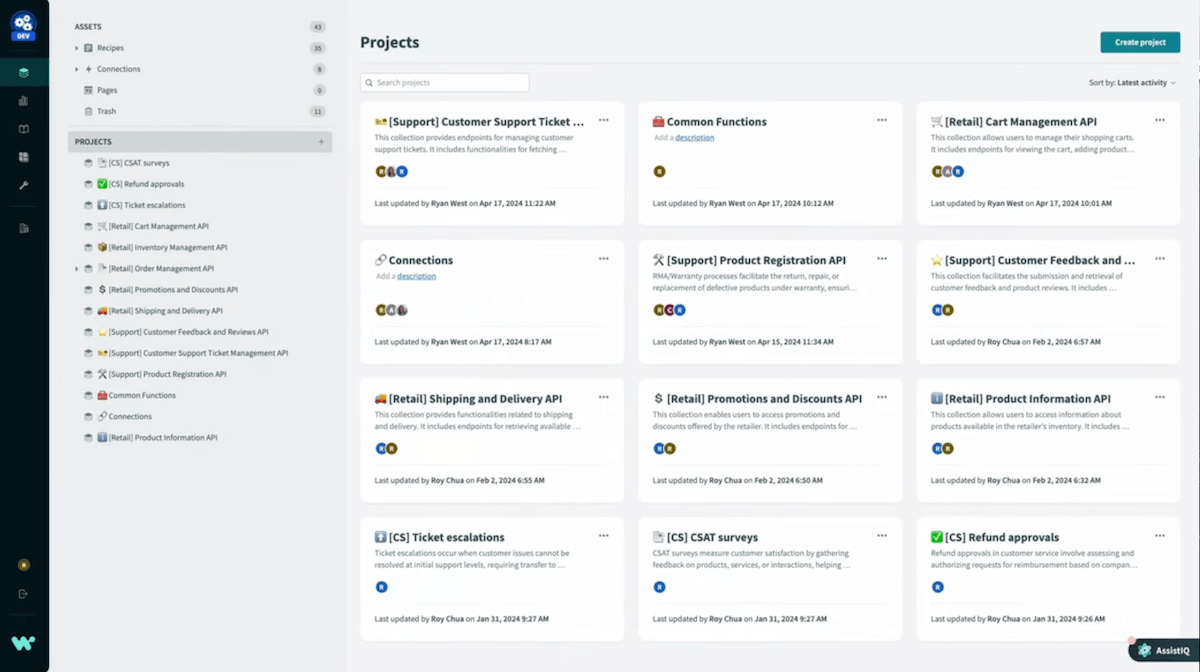
Founded in 2012, Workato is a leader in the Gartner's Magic Quadrant for iPaaS solutions. It is especially known for its workflow automation solutions. It combines integration, process automation, and API management in a single platform.
Workato's platform is designed to be used by both IT professionals and business users, with a focus on rapid implementation. It offers a large library of pre-built connectors and "recipes" (integration templates) to accelerate the integration process.
What is Jitterbit
Jitterbit is a versatile iPaaS solution known for its ease of use and speed in deploying cloud-based integrations. It focuses on simplifying the integration process with its intuitive design and rich library of pre-built templates and connectors.
Founded in 2003, Jitterbit has built a reputation for delivering quick and efficient integrations across various SaaS applications and systems. Its Harmony platform provides a low-code environment for creating and managing integrations, catering to both technical and non-technical users.

Workato vs. Jitterbit integration platform comparison
Today there are literally hundreds of different integration solutions to choose from. As an enterprise IT leader you're likely to need a solution that fits your unique enterprise integration patterns.
Let’s review how Workato and Jitterbit compare in five common integration scenarios: API management, data integration, B2B/EDI integration, application integration, and system integration.
API Management
Jitterbit's API Manager allows users to create, publish, and manage API integrations between software systems. The platform supports REST and SOAP APIs and offers tools for designing, deploying, and securing APIs.
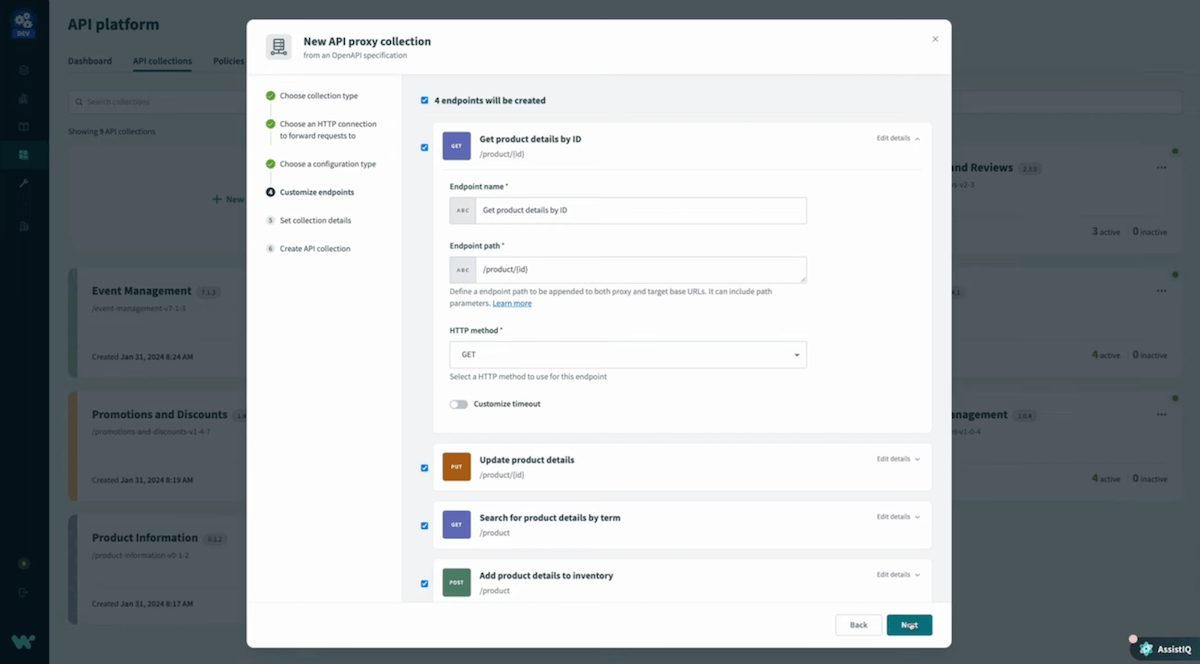
Workato's API Management Platform allows users to create, manage, and monitor APIs for integrated communication between different software systems. The platform supports REST and SOAP APIs and offers tools for building, deploying, and securing APIs. It includes pre-built connectors and templates to facilitate low-code integrations.
Data Integration
Jitterbit Harmony iPaaS supports the synchronization of data across various systems in real-time or through scheduled batches. The platform supports a wide range of data sources, including databases, cloud services, and on-premises systems. Users can map, transform, and cleanse data to ensure accuracy and consistency.
Workato's Data Orchestration solutions support synchronization of data across multiple systems in real-time or through scheduled batches. It supports a wide range of data sources, including databases, cloud services, and on-premises systems. Users can map, transform, and cleanse data to ensure accuracy and consistency.
B2B/EDI Integration
Jitterbit's Harmony EDI solution supports the exchange of electronic documents with trading partners using standardized formats like X12 and EDIFACT. The platform offers pre-configured EDI templates for common documents such as orders, invoices, and shipping notices.
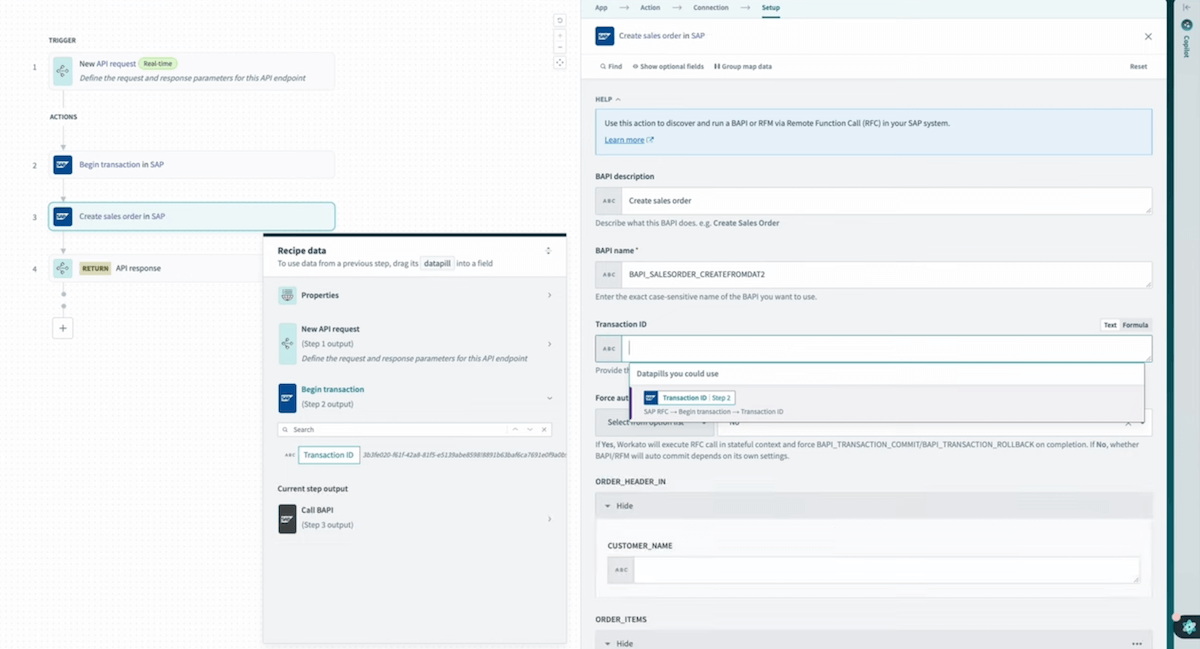
Workato supports B2B/EDI integration, allowing businesses to exchange electronic documents with trading partners using standardized formats like X12 and EDIFACT. It offers pre-configured EDI templates for common documents such as orders, invoices, and shipping notices.
Application Integration
Jitterbit enables application integration with its intuitive drag-and-drop interface, enabling users to map and transform data easily. It supports a wide range of data sources and formats, ensuring seamless data integration and synchronization.
Workato's app integrations includes pre-built connectors for popular SaaS applications like Salesforce, NetSuite, and Shopify. The platform includes a drag-and-drop interface and automated workflows between different apps.

System integration
Jitterbit Harmony iPaaS connects various applications to streamline business processes. The platform includes pre-built connectors for popular SaaS applications like Salesforce, NetSuite, and Shopify. Harmony includes pre-built connectors, a drag-and-drop interface and automated workflows across different apps.
Workato is capable of integrating a wide array of enterprise systems, including ERP, CRM, and HR platforms. The platform provides tools for data transformation, error handling, and monitoring, facilitating seamless data exchange and process automation across systems.
What changed for Workato and Jitterbit in 2026
Both vendors moved substantially in the last 18 months, and in the same direction: from integration platforms into AI agent platforms. That matters for buyers, because agents are one more layer to govern on top of the integrations you were already governing.
Workato
Workato brought orchestration and AI together under Workato One, then launched Agent Studio for building AI agents on top of its integration layer. In July 2026 it added two capabilities to that: a Headless API for embedding agents into any application surface, and Agent Guardrails, a set of configurable controls for data protection, access management and compliance. Its connector library passed 1,200 pre-built connectors in March 2026.
Jitterbit
Jitterbit spent 2025 building AI into Harmony: assistants that help build, maintain and manage integrations, APIs and applications, the ability to build custom AI agents, and a marketplace of prebuilt agents. It also implemented a Model Context Protocol framework, the emerging standard for connecting AI models to external tools and data.
On 3 August 2026 the company appointed Mark Logan as President and CEO. Bill Conner, CEO for the previous 2.5 years, moved to the board. Logan joins from One Identity, where he was CEO. Leadership changes are worth noting when you are evaluating a platform on multi-year annual contracts.
What this means for the evaluation
Both platforms now ask you to operate more, not less. The integrations still need building, monitoring and maintaining, and now the agents built on top of them need governing, permissioning and auditing too. If your integration team was already at capacity in 2025, neither 2026 roadmap reduces that load.
Factors to consider when comparing Workato and Jitterbit
While both integration platforms offer similar capabilities, you can map out several factors can help determine which solution is best suited for your organization:
- Ease of Use:
Both Workato and Jitterbit are known for their intuitive interfaces. Workato’s extensive library of automation recipes allows for rapid deployment, making it a favorite for teams seeking quick solutions. Jitterbit’s straightforward design and drag-and-drop tools simplify complex integrations, ideal for users with limited coding experience.
- Scalability and Performance:
Workato offers robust scalability with its automation-focused architecture, which is suitable for handling large-scale integrations efficiently. Jitterbit also provides strong performance, especially in environments requiring fast processing and real-time data handling.
- Community and Support:
Workato has an active community of citizen developers and extensive resources, including a large library of pre-built recipes and strong customer support. Jitterbit’s community is focused on providing quick solutions and practical advice, making it appealing to smaller teams.
- Integration Capabilities:
Workato specializes in automation with its powerful workflow capabilities and integrations across various platforms. Jitterbit, on the other hand, is stronger in API management and offers comprehensive tools for EDI and B2B integrations, making it versatile for different integration scenarios.
Why choose Workato?
Workato can be a solid choice if you're looking for an automation-focused ntegration platform that combines iPaaS capabilities with robust workflow automation. It's particularly well-suited for businesses that want to empower both IT and business users to create and manage integrations and process automations.
Workato highlights:
- Intuitive, low-code interface accessible to both IT and business users
- Large library of pre-built connectors and "recipes" (integration templates)
- AI-powered suggestions for optimal integration patterns
- Strong workflow automation capabilities
Why choose Jitterbit?
Jitterbit is a credible option for businesses seeking rapid deployment and ease of use. Its intuitive tools and quick setup make it perfect for teams looking to streamline integrations without extensive coding.
Jitterbit Highlights:
- Fast, low-code integration capabilities
- User-friendly interface
- Flexible API management and automation features
ONEiO as an alternative to Workato and Jitterbit
ONEiO is a managed integration service, sometimes described as managed iPaaS. It delivers the same outcomes an iPaaS delivers, which is any-to-any connectivity, lifecycle management and cloud-native delivery, with one structural difference: ONEiO designs, runs, monitors and maintains the integrations, with SLA-backed outcomes and 24/7 operations. Customers decide how much control they keep.
ONEiO is headquartered in Helsinki, Finland, and serves IT service providers and enterprise IT teams including DNV, Telia, Trumpf, Paulig, Hexagon and the City of Espoo.
Choose ONEiO when: you want integration outcomes without staffing an integration team. Choose Workato or Jitterbit when you have mature in-house integration engineering and want maximum platform control.
.png)
ONEiO gives you a streamlined, no-code integration service that stands out for several reasons:
Effortless integrations as a service
While Workato and Jitterbit have some low- and no-code functionality, ONEiO is the first integration platform that offers end-to-end integrations as a service. This is especially valuable in case you don’t plan to hire a full team of system integrators to maintain your integration ecosystem.
Integration automation beyond pre-built connectors
ONEiO supports a wide range of endpoint types and data formats, including JSON, XML, CSV, and plain text. It provides robust mechanisms for both push (using webhooks and REST/SOAP) and pull (via API, SFTP, SQL) data processing. This flexibility ensures that ONEiO can handle various integration scenarios with ease.
Security and compliance
ONEiO offers strong security features, including encrypted credentials and support for multiple authentication standards (Basic Authentication, Token, API Key, OAuth, etc.). It also allows connections to internal networks and supports reverse proxies or whitelisting. The platform is built on AWS and ensures high availability and GDPR compliance.
Business logic and data orchestration
ONEiO provides a no-code editor for creating business logic, transforming, and translating data. It supports various transformation options like regular expressions, case transformations, and date formatting. The platform’s rule robot automates rule creation based on common use cases, making it easy to adjust or add new rules without disrupting existing integrations.
.png)
Where ONEiO fits best
ONEiO's core use case is service integration: connecting an IT service desk to a partner's, a customer's, or another internal tool, across organisational boundaries, without locking either side to a single vendor. That includes ServiceNow to Jira, ServiceNow to ServiceNow across two companies, and multi-vendor SIAM environments where every supplier runs a different system.
This is the scenario Workato and Jitterbit can both technically handle and neither is built around.
What changes when integration is a service rather than a platform
One integration connects multiple endpoints. No point-to-point custom work for each new connection. Customer systems stay as they are and keep evolving independently. Adding the tenth partner costs roughly what adding the second one did.
"I don't care what kind of system the customer is using, we can connect any with any. And that is really one of the biggest benefits I see on ONEiO, which no other solution provider I know can promise or deliver." — Michael, MHP
Continuity is somebody's job. Microservices spread across geographic sectors with load balancing. Persistent queuing so data is not lost when a system on either end goes down. AI-powered monitoring 24/7/365. Upgrades, migrations and partner-side changes handled without breaking flows.
"Unbothered. I think that's the thing, how it changed us. We use our time to do other things, to monitor other things instead of the data exchanges." — Dmitri, Espoo
Outcomes are committed, not attempted. Integration specialists own security and compliance for the integrations themselves, not just for the platform underneath them. Issues are caught and resolved before they reach the business. Delivery is measured in weeks.
"ONEiO delivered that in three weeks, which is a remarkably great job." — Hanna, DNV
When ONEiO is not the right fit
Say this plainly. It is what makes the rest credible.
- You have a mature in-house integration engineering team and want maximum platform control. Buy the platform.
- Your requirement is a data pipeline: ETL, ELT, warehouse loading. Look at Fivetran, Airbyte or Talend. ONEiO operates the integration layer between business systems, not the data infrastructure beneath it.
- You want business users self-serving their own automations. That is Workato's design centre, not ONEiO's.
- You need low-code application development alongside integration. That is Jitterbit's App Builder, not ONEiO's.
- You want to build and run your own AI agents on top of your integration layer. Both platforms now offer that. ONEiO does not.
- You have exactly two systems to connect, once, and they will not change. A point-to-point build is cheaper.
Who does the work comparison
Bottom line on Workato vs. Jitterbit
The choice between Workato and Jitterbit comes down to where your systems live and what you are integrating. Cloud estate and business-process automation, Workato. On-premises components, EDI and API management, Jitterbit, whose private agents reach places cloud-only platforms cannot.
The harder question is the one the comparison hides. Both answers commit you to operating an integration platform: building on it, watching it, maintaining it as every system on both ends keeps changing, and as of 2026, governing the AI agents both vendors have added on top. For teams already at capacity, that commitment costs more than the licence does.
Managed iPaaS removes the commitment. Same outcomes, operated by people whose only job is operating them.