

Quick answer
MuleSoft is an API-led integration platform owned by Salesforce, built for enterprise API programmes and deep Salesforce ecosystem integration. Workato is a cloud-only integration and automation platform built for business-led workflow automation. ONEiO is managed iPaaS: the same integration outcomes delivered as a service, without operating a platform.
Integrations hold together today's enterprise IT ecosystems. As you integrate even more apps, systems and cloud services, you need a solution that scales up with your growing needs.
In this article we compare MuleSoft and Workato, two well-known integration platform as a service (iPaaS) vendors found in the market today.
Key takeaways
- MuleSoft is the enterprise API platform. Anypoint covers API design, policy management, monitoring and a developer portal. It assumes engineering capacity, and it is deepest inside the Salesforce ecosystem.
- Workato is the business automation platform. Low-code recipes let business users build with IT governance around them, across more than 1,200 pre-built connectors as of March 2026.
- Workato is cloud-only. MuleSoft supports cloud, hybrid and on-premises deployment. For estates with legacy systems this is usually the deciding factor.
- Both shipped agent platforms. MuleSoft launched Agent Fabric to govern agents built on any platform. Workato added Agent Studio, then a Headless API and Agent Guardrails in July 2026.
- Managed iPaaS is the third option. ONEiO delivers the same integration outcomes, but ONEiO designs, runs, monitors and maintains the integrations, with SLA-backed outcomes and 24/7 operations.
What is MuleSoft
MuleSoft is a major player in the integration platform as a service (iPaaS) market focused on an API-led integrations. Acquired by Salesforce in 2018, MuleSoft is best known for its Anypoint Platform, which offers broad capabilities for API management and integration.
For ITSM professionals, MuleSoft's value lies in its ability to create a cohesive yet flexible integration network via its Anypoint Platform. Working like an enterprise service bus (ESB), Anypoint allows you to design, deploy, and manage APIs and integrations in a unified manner, supporting both SOA (Service-Oriented Architecture) and microservices environments.

In recent years, MuleSoft has expanded its focus into process automation, offering robotic process automation (RPA) and intelligent document processing (IDP) functionality. These areas bring MuleSoft's service offering closer to broad, intelligent automation platforms like Workato and UiPath.
What is Workato
Workato is a cloud-based integration and automation platform that provides a low-code environment for integrating diverse applications, managing APIs, automating workflows, and synchronizing data across on-premises and cloud systems.

Founded in 2012, Workato is a leader in the Gartner's Magic Quadrant for iPaaS solutions. It is especially known for its workflow automation solutions. It combines integration, process automation, and API management in a single platform.
Workato's platform is designed to be used by both IT professionals and business users, with a focus on rapid implementation. It offers a large library of pre-built connectors and "recipes" (integration templates) to accelerate the integration process.
MuleSoft vs. Workato integration platform comparison
Let’s go through how MuleSoft and Workato compare in five common integration scenarios: API management, data integration, B2B/EDI integration, application integration and system integration.
API Management
MuleSoft's Anypoint Platform is built for API management. It provides an API Designer for creating RAML or OAS specifications, allowing you to define your API contract before implementation. An API Manager lets you set policies and monitor usage, giving you control over your API's behavior and performance. An API Portal offers documentation and interactive testing capabilities. Overall, MuleSoft gives you one of the most comprehensive solutions for managing API integrations.

Workato's API Management Platform allows users to create, manage, and monitor APIs for integrated communication between different software systems. The platform supports REST and SOAP APIs and offers tools for building, deploying, and securing APIs. It includes pre-built connectors and templates to facilitate low-code integrations.
Data Integration
MuleSoft approaches data integration through its own DataWeave data language, which allows for complex data manipulations. The AnyPoint platform supports batch processing for handling large volumes of data, and works with various data formats including XML, JSON, and CSV. The platform also has a large number of ETL/ELT features to support data integrations.
Workato's Data Orchestration solutions support synchronization of data across multiple systems in real-time or through scheduled batches. It supports a wide range of data sources, including databases, cloud services, and on-premises systems. Users can map, transform, and cleanse data to ensure accuracy and consistency.

B2B/EDI Integration
MuleSoft supports B2B integrations through EDI message parsing and generation capabilities. It includes support for the AS2 protocol, commonly used in B2B communications. In addition, AnyPoint includes Partner Manager features to handle external data integrations and different data standards of partners.
Workato supports B2B/EDI integration, allowing businesses to exchange electronic documents with trading partners using standardized formats like X12 and EDIFACT. It offers pre-configured EDI templates for common documents such as orders, invoices, and shipping notices.
Application Integration
MuleSoft supports application integration through Anypoint Connectors for popular SaaS and on-premises applications. For custom applications, it offers a connector SDK. AnyPoint’s Flow Designer provides a visual environment for creating integration flows between different applications.

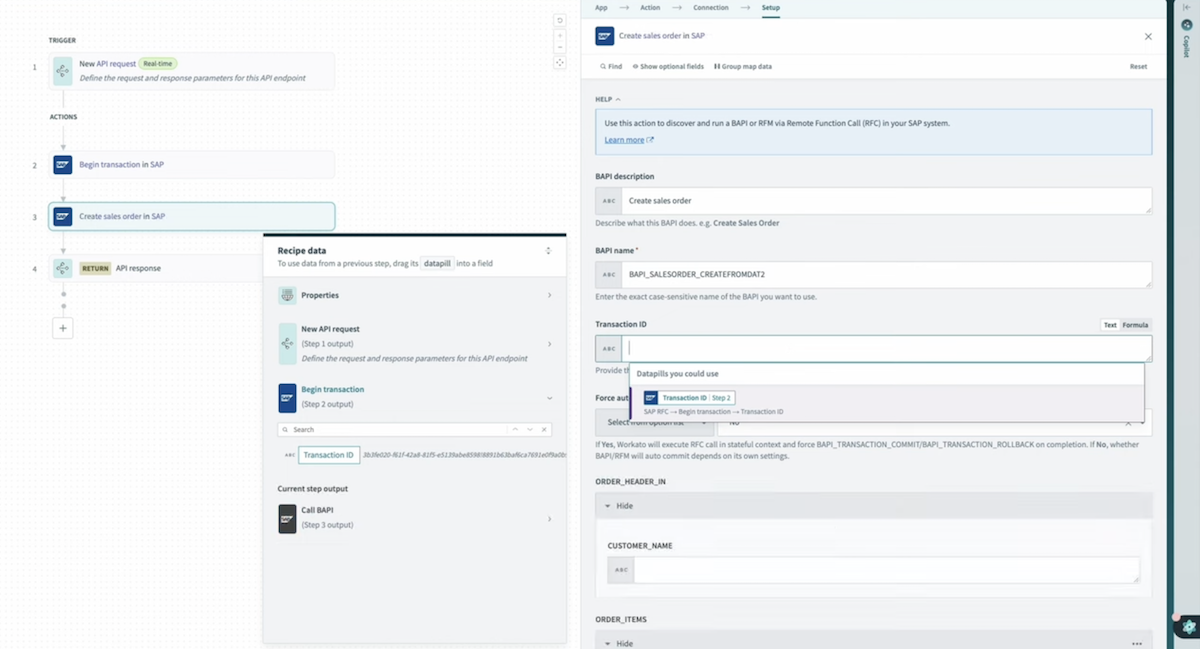
Workato's app integrations includes pre-built connectors for popular SaaS applications like Salesforce, NetSuite, and Shopify. The platform includes a drag-and-drop interface and automated workflows between different apps.
System Integration
As MuleSoft is owned by Salesforce, you can guarantee that they have deep ERP and CRM system integration capabilities. MuleSoft supports various system integration patterns, including real-time, batch, and event-driven architectures.
Workato is capable of integrating a wide array of enterprise systems, including ERP, CRM, and HR platforms. The platform provides tools for data transformation, error handling, and monitoring, facilitating seamless data exchange and process automation across systems.
What changed for MuleSoft and Workato in 2026
Both vendors spent the last year building agent platforms on top of their integration layers, and in both cases the agent work is now the headline.
MuleSoft launched Agent Fabric, generally available from October 2025. It targets agent sprawl: AI agents multiplying across an enterprise on different platforms with nobody holding a list. Agent Registry handles discovery and registration, Agent Broker routes tasks to the agent best suited to them, Agent Visualizer maps the estate and its performance, and Agent Governance applies security and policy controls. It is designed to govern agents regardless of which platform built them.
Workato brought orchestration and AI together under Workato One, launched Agent Studio, and in July 2026 added a Headless API for embedding agents into any application surface plus Agent Guardrails, configurable controls for data protection, access management and compliance.
What this means for the evaluation. Both roadmaps are credible and both address a real problem. Neither reduces the work underneath. The integrations still need building, monitoring and repairing when an upstream system changes, and both vendors have now added a second estate to govern on top of the first. If your integration team is the constraint today, read both roadmaps as a forecast of what that team will be asked to own next year.
Factors to consider when comparing MuleSoft and Workato
While both platforms offer robust integration capabilities, there are some key differences to consider:
- Scalability:
MuleSoft uses a clustered architecture for enterprise-scale deployments. Workato leverages a cloud-native architecture that automatically scales based on workload demands.
- Monitoring:
MuleSoft provides Anypoint Monitoring with customizable dashboards for oversight. Workato offers real-time monitoring and alerts, with detailed logs and analytics for each integration.
- Security and compliance:
Both platforms have extensive security features. MuleSoft offers Anypoint VPCs for isolated network environments. Workato emphasizes end-to-end encryption and compliance with various industry standards (HIPAA, SOC 2, GDPR).
- Customer base:
MuleSoft has a larger, more established ecosystem, particularly in the enterprise space. Workato, while younger, has a rapidly growing community and emphasizes collaborative development through its recipe-sharing platform.
Why choose MuleSoft?
MuleSoft may be a good option for you if you’re consolidating your enterprise tech stack around Salesforce. It can handle most cloud-based integration patterns and a broad range of pre-built connectors to and from Salesforce apps.
MuleSoft highlights:
- API creation and integration capabilities.
- Supports automation with a large template library and RPA access.
- Wide capabilities in composite service integration.
Why choose Workato?
Workato can be a solid choice if you're looking for an automation-focused ntegration platform that combines iPaaS capabilities with robust workflow automation. It's particularly well-suited for businesses that want to empower both IT and business users to create and manage integrations and process automations.
Workato highlights:
- Intuitive, low-code interface accessible to both IT and business users
- Large library of pre-built connectors and "recipes" (integration templates)
- AI-powered suggestions for optimal integration patterns
- Strong workflow automation capabilities
ONEiO as an Alternative to MuleSoft and Workato
If you’re not sure if MuleSoft or Workato is the best option for your integration needs, you may consider a third alternative, ONEiO.
.png)
ONEiO gives you a streamlined, no-code integration service that stands out for several reasons:
Effortless integrations as a service
While MuleSoft and Workato have some low- and no-code functionality, ONEiO is the first integration platform that offers end-to-end integrations as a service. This is especially valuable in case you don’t plan to hire a full team of system integrators to maintain your integration ecosystem.
Integration automation beyond pre-built connectors
ONEiO supports a wide range of endpoint types and data formats, including JSON, XML, CSV, and plain text. It provides robust mechanisms for both push (using webhooks and REST/SOAP) and pull (via API, SFTP, SQL) data processing. This flexibility ensures that ONEiO can handle various integration scenarios with ease.
Security and compliance
ONEiO offers strong security features, including encrypted credentials and support for multiple authentication standards (Basic Authentication, Token, API Key, OAuth, etc.). It also allows connections to internal networks and supports reverse proxies or whitelisting. The platform is built on AWS and ensures high availability and GDPR compliance.
Business logic and data orchestration
ONEiO provides a no-code editor for creating business logic, transforming, and translating data. It supports various transformation options like regular expressions, case transformations, and date formatting. The platform’s rule robot automates rule creation based on common use cases, making it easy to adjust or add new rules without disrupting existing integrations.
.png)
When to choose ONEiO?
ONEiO is especially well suited for seamless ITSM integration across internal and externally managed IT services. It offers a turnkey solution for the complex integration needs of both global enterprises and IT service providers.
ONEiO highlights:
- ONEAi artificial intelligence model trained specifically for IT service integration.
- Faster time-to-value. Typical integrations take 2 weeks from idea to production.
- 100% satisfaction guarantee based on proven enterprise-grade integration service.
When ONEiO is not the right fit:
- You have a mature in-house integration engineering team and want maximum platform control. Buy the platform.
- You are running a formal API programme with published, externally consumed APIs. That is MuleSoft's design centre.
- You want business users self-serving their own automations. That is Workato's.
- You want to build and govern your own AI agent estate. Both vendors now sell that. ONEiO does not.
- You have exactly two systems to connect, once, and they will not change. A point-to-point build is cheaper.
What changes when integration is a service rather than a platform
ONEiO is a managed integration service, sometimes described as managed iPaaS. It delivers the same outcomes an iPaaS delivers, which is any-to-any connectivity, lifecycle management and cloud-native delivery, with one structural difference: ONEiO designs, runs, monitors and maintains the integrations, with SLA-backed outcomes and 24/7 operations. Customers decide how much control they keep.
Choose ONEiO when: you want integration outcomes without staffing an integration team. Choose MuleSoft or Workato when you have mature in-house integration engineering and want maximum platform control.
One integration connects multiple endpoints. No point-to-point custom work for each new connection. Customer systems stay as they are and keep evolving independently. Adding the tenth partner costs roughly what adding the second one did.
"Scale without custom work. That's something I really enjoy with ONEiO. It's kind of simple." — Visa, Paulig
Continuity is somebody's job. Microservices spread across geographic sectors with load balancing. Persistent queuing so data is not lost when a system on either end goes down. AI-powered monitoring 24/7/365. Upgrades, migrations and partner-side changes handled without breaking flows.
"We can trust the interface, and we can trust the team behind." — Gabriel, Trumpf
Outcomes are committed, not attempted. Integration specialists own security and compliance for the integrations themselves, not just for the platform underneath them. Issues are caught and resolved before they reach the business.
"How fast and quick I was able to set it up." — Ivan, Hexagon
Who does the work?
Bottom line on MuleSoft vs Workato
If you are running a formal API programme and consolidating around Salesforce, MuleSoft. If the real problem is business-process automation across cloud applications and you want business users involved, Workato. If any meaningful part of your estate is on-premises, Workato is out, because it is cloud-only.
What changed in 2026 is that both are now selling agent platforms with integration underneath. That is a defensible bet on where enterprise software is heading.
It does not change the arithmetic on your side of the contract. Integrations break when something upstream moves, usually without warning. On both platforms, the person who finds out first works for you.